NoGaOS
Smooth a child's way into computers. Give them the same experience we had in the 90s.
History
This project started as a burst of nostalgia: I keep very fond memories of my 90s experiences with early computers, and the early Internet, and I wanted my kids to be able to experience the same thing. Today's computers don't feel like that: they're slow (even with faster hardware!), full of things you don't need, and basically overwhelming for a kid. The Internet also doesn't feel the same: full of ads and people trying to sell you something or trick you in some way.
I bought a Raspberry Pi 500 for my kids, which included Raspberry Pi OS, and I let them loose. I soon saw that they had trouble with the basics (as expected, it was their first time really using a computer), but there was a mix of essential and accidental complexity. I've been building software for over two decades now, and I like to think I have good taste for UX, so equipped with AI (sorry, this project is written with AI; I don't have the skills to build such a complex system in my free time in a reasonable timeframe) I started a small spike to see if I could do better.
After a few days I had something decent. It ran as an app inside Raspberry Pi OS, which created a bit of friction as my kids had two status bars, but everything looked right. Iteration after iteration, the project kept growing. As of today (November 2026), NoGaOS feels like a real OS, and it's starting to be used in a school. We'll see what the future holds.
The name and the logo
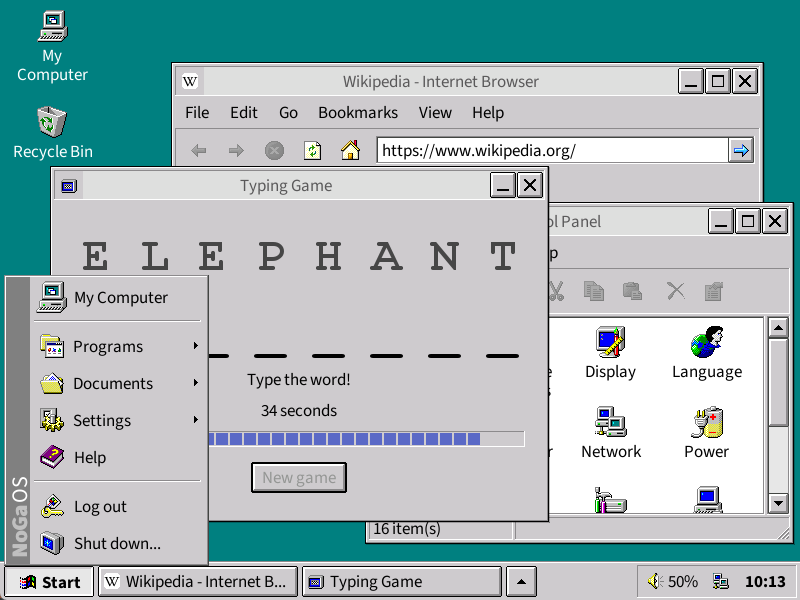
Screenshots
Screen recording
Running it
Install Java 17 or newer, then run the downloaded file:
java -jar nogaos-253.jarThe first start asks you to create an account. Video and audio playback need VLC installed on the computer; nothing else does.
A computer of their own
An old laptop or a Raspberry Pi can become a NoGaOS computer: it powers on straight into NoGaOS, with no login prompt and no Linux desktop reachable behind it. Install Debian (the small "netinst" image, with no desktop environment selected) or Raspberry Pi OS Lite, log in, and run:
wget -qO install-kiosk.sh https://nogaos.org/install-kiosk.sh && sudo bash install-kiosk.shIt installs Java and everything else NoGaOS needs, downloads the latest version and sets the computer to start it on boot. It is a plain script you can read first, and running it again is safe.
Status
This is a personal project, written for my own children and shared in case it is useful to anyone else. It is early and it has rough edges. If you try it, bug reports and comments are welcome.